
Introduction
A developer's best friend
Welcome to Gusto's App Integrations API documentation! If you're looking for Gusto Embedded documentation, please click here.
This site serves as both a technical reference for the endpoints available and a general overview of payroll. We designed the objects and their properties to require as little domain-specific payroll knowledge as possible. We are dedicated to developer success by offering robust APIs, detailed documentation, self-service tools, and hands-on support, so you can focus on building payroll products that solve customer problems.
Please NoteWe currently do not support API access for Gusto customers looking to connect their own company systems directly to their Gusto account using the API. We hope to offer this in the future and appreciate your patience in the meantime.
Before you build: Production Pre-Approval
Read this before you invest in a buildProduction access is gated, and not all applications are approved. Production Pre-Approval is not a formality.
To launch on Gusto you must have an approved Production Pre-Approval and Security Review — the information for both is collected in the Production Pre-Approval application. Without that approval, we cannot provide implementation support, QA review, or issue production keys.
We strongly recommend you apply and receive approval before you start building. You can begin building beforehand, but because production access depends on approval — which is not guaranteed — building first is at your own risk.
You must have a Developer Portal account to complete the application. Information collected during pre-approval is handled in accordance with our Developer Terms.
Who we work with & what we look for
Gusto partners with third-party software that creates an integration with our API to help solve problems for shared customers. We work with many types of apps, including accounting, applicant tracking, performance management, time tracking, and business operations software.
| ✅ A good fit | ❌ Not currently supported |
|---|---|
| You're a software product serving businesses, building an integration for customers you and Gusto share. | Early-stage products still establishing a track record of serving small businesses. |
| Your use case maps to a supported category (accounting, ATS, performance, time tracking, business operations, and similar). | A Gusto customer connecting their own company systems directly to their own Gusto account via the API. . |
Developing with Gusto: What to expect
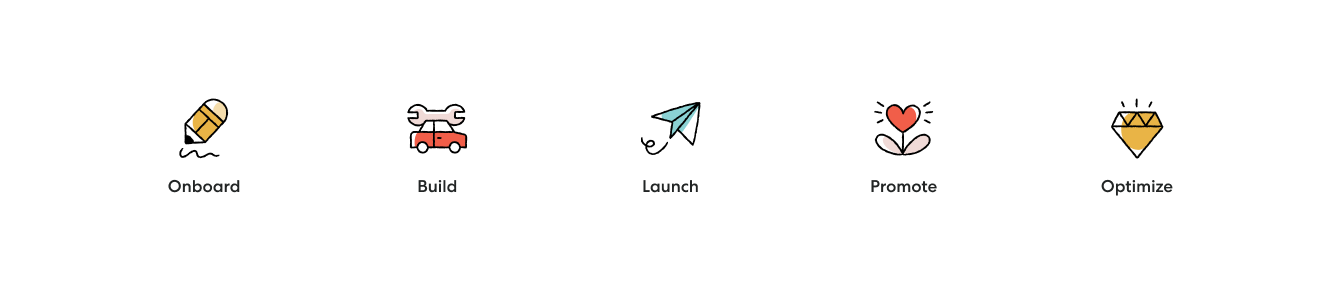
The developer journey has five phases: Onboard → Build → Review → Launch → Optimize. Production Pre-Approval (above) runs alongside Onboard and Build, and an approval is required before Review can issue you production keys.
Onboard
To get started, sign up for a Developer Portal account, onboard to our sandbox environment, and — as early as possible — submit your Production Pre-Approval application (see above).
Once you’ve created an account and completed your Organization setup, you can then create an application to obtain API credentials - or “keys” - to access our demo environment. To create an application, you will need to provide at least one(1) redirect URI. You can enter multiple redirects for a single application - please do this instead of creating multiple applications for each one. OAuth2 does not support wildcard URIs or URIs with fragments (e.g #). You can change your Demo Application redirects. From the Applications tab of your Developer Portal account, click “Edit” and adjust the redirect as needed for your Application. To change the redirect for your Production Application, please reach out to [email protected]
The application will generate a uniqueclient_id and secret to be used for authentication.
After you create an application you will need to create a demo company so that you can explore our product and successfully connect your application to Gusto via OAuth2 to begin making calls to the API. Demo companies are automatically generated with company info, employees, and previous payrolls so you can begin testing right away. The Authentication Example has everything you need to get started.
Once you have your client_id, secret, and a demo company, you’re ready to begin building your integration. Check out this short video tutorial for an introduction on testing the Gusto API (in demo).
You can invite team members to join your developer account, too. This is done from the Organizations tab under Team.
Build
As noted above, we strongly recommend you have an approved Production Pre-Approval before you build. Building beforehand is possible, but production access is gated pending approval and not all applications are approved — so building first is at your own risk.
If your Production Pre-Approval is approved, you'll be granted access to our Partner Checklist. Once granted, make a copy for your company and use it to scope your build and ultimately submit it to Gusto for review.
The API keys initially accessible from Gusto's Developer Portal are for our sandbox environment only (https://api.gusto-demo.com). Use these in tandem with your Gusto demo accounts to build your application.
Review the API Reference for sample code snippets applicable to each endpoint.
Review
Gusto requires a quality review ("QA") and an approved Production Pre-Approval application for all builds using our API before we issue production keys. This ensures everything will function properly and provide a best-in-class customer experience once live.
The review process for an Integrated App requires the Partner Checklist created in the previous stage to be completed and shared with [email protected].
The review process for a Gusto Embedded Payroll product is different and you will be working directly with our Partnerships team through this process.
During review, all applications will be assigned API scopes based on your integration use-case. These scopes must be tested in our demo environment and will be enforced in our production environment upon approval. Any API call made outside of your assigned scope in production will be rejected. You'll be able to request additional scopes or request changes to your scopes by contacting [email protected] after releasing to production.
Once your integration is approved, Gusto’s Developer Relations team will issue your production keys to your developer account to access at any time.
Launch
Move your build to production and make it available to customers. You’ll want to update your website or marketplace and publish support content for visibility. Once you train your sales team, it’s time to get the word out.
Optimize
Performance starts with promotion — send press releases, post on social, and email your customers. You can track API usage and review feedback and errors to improve overtime.
Can I make test calls in production after my integration has passed QA and launched?
Unfortunately, we cannot support demo or test accounts in production at this time.
Updated 3 months ago