---
updatedAt: 2025-12-02T00:26:10.000Z
---
Fetch the complete documentation index at: https://docs.gusto.com/embedded-payroll/llms.txt. Use this file to discover all available pages before exploring further. Append .md to any documentation page URL to get its markdown version.
# Payroll fundamentals
Payroll is complicated—there's no getting around that. But Gusto Embedded does the heavy lifting for you, handling everything from tax calculations to bank transfers. This guide walks you through how it all works so you can focus on creating great user experiences.
## Companies and employees
Companies are collections of employees, anywhere from one person to hundreds. After you set up employee data like compensation, addresses, and tax information, there's little need for frequent updates.
#### Company onboarding essentials
To [onboard a company](https://docs.gusto.com/embedded-payroll/docs/onboard-a-company), you'll need:
* Company details (such as name, EIN)
* Business locations
* Bank account information
Companies can have multiple work locations across different states. They might want everyone paid at the same time, or prefer different pay schedules based on location or job type.
#### Employee onboarding essentials
To onboard a W2 employee, you'll collect:
* Personal details (such as name, addresses)
* Pay rates (salaried or hourly)
* Benefits deductions
* Tax withholding preferences
## How payroll works
### Pay periods
Pay periods are the foundation of payroll. Everything else—compensation, time tracking, taxes, expense reports—depends on when it happened.
A pay period is defined by three things:
* A company
* A group of employees (not necessarily all of them)
* A specific time range with a `start_date` and `end_date`
### Regular vs off-cycle payrolls
**Regular payrolls** follow a set schedule and include everything for that pay period:
* Paid time off (vacation, sick, holiday, custom policies)
* Hours worked
* Bonuses and commissions
* Other earnings
The company's payroll admin sets the pay schedule (such as monthly or biweekly) and start date. Each payroll gets a specific pay period with start and end dates—no overlapping is allowed.
**[Off-cycle payrolls](https://docs.gusto.com/embedded-payroll/docs/create-an-off-cycle-payroll)** handle one-off situations like [corrections](https://support.gusto.com/article/999908231000000/Off-cycle-payrolls) or special bonuses. They use the same withholding rates, deductions, and contributions as regular payrolls, but aren't tied to the regular schedule.
## Employee pay breakdown
#### Gross pay
Gross pay is what employees earn before taxes and deductions. Employees can be:
* **Salaried**: Fixed amount each pay period
* **Hourly**: Paid based on hours worked
* **Both**: Base salary plus additional earnings
We call these earnings `compensations` in the API:
* `hourly_compensations`: Wages calculated by the hour
* `fixed_compensations`: Bonuses, commissions, tips, and other flat amounts
For **salaried employees**, Gusto calculates regular hours in the `hourly_compensations` array based on the pay schedule. For **hourly employees**, this array starts empty since hours are tracked per pay period.
Use the `flsa_status` in [compensation](https://docs.gusto.com/embedded-payroll/reference/get-v1-compensations-compensation_id) to determine if an employee is hourly or salaried.
#### From gross pay to net pay
Here's how gross pay is reduced to what employees actually take home:
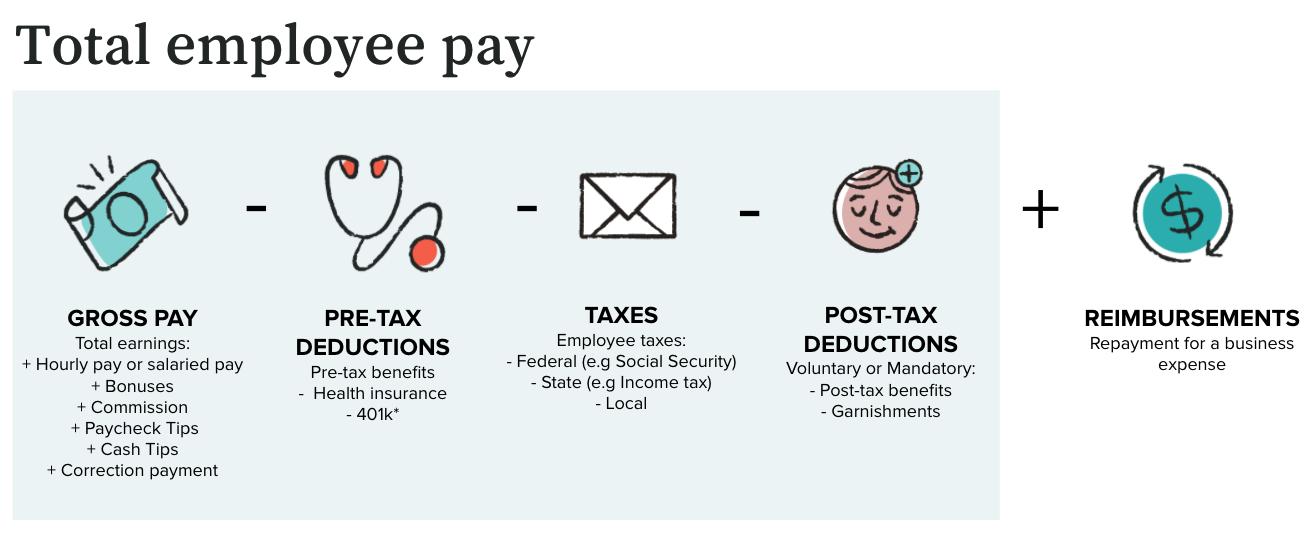
1. Start with **gross pay** (total earnings before anything comes out)
2. Subtract **pre-tax deductions** (such as health insurance)
3. Calculate and subtract **taxes** (federal, state, or local, depending on work location)
4. Subtract **post-tax deductions** (such as garnishments)
5. Add **reimbursements** (business expenses)
**Result**: **Net pay** (what goes to the employee via ACH direct deposit or check)
#### Important notes about garnishments
Except for child support, Gusto doesn't automatically debit garnishments on behalf of the user—the user will need to handle those payments separately. That's why garnishments don't appear in payroll totals (except child support). You'll find them in individual employee records under `deductions`, as separate line items from `benefits` or `employee_benefits_deductions`.
*Gusto remits payment for most US states, except South Carolina, US territories, and Tribal Support agencies.*
## Movement of money
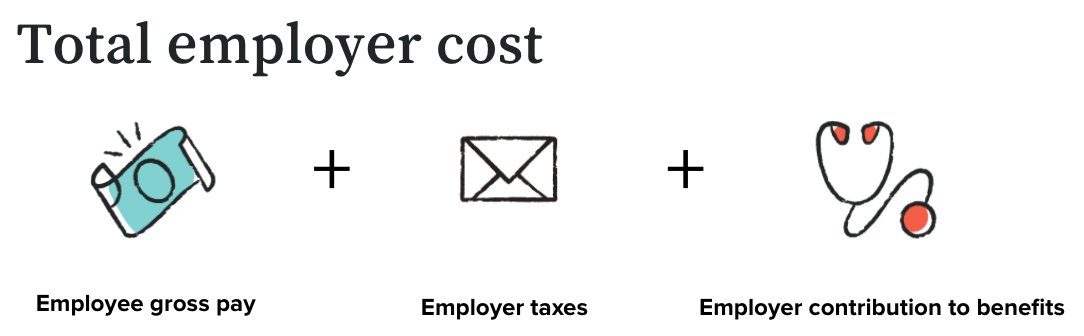
Once the payroll admin reviews employee pay and employer cost and [submits the payroll](https://docs.gusto.com/embedded-payroll/docs/complete-a-regular-payroll), money moves from the company's bank account to employees and tax agencies. After this point, canceling payroll becomes much more complicated.
> 📘
>
> Gusto supports **next-day**, **2-day**, and the standard **4-day** payroll processing. Learn more about [processing speeds](https://docs.gusto.com/embedded-payroll/docs/2-day-vs-4-day).
#### Debits initiated
Gusto will initiate up to 4 separate debit transactions from a company's bank account after each payroll is submitted:
1. **Employee pay**(direct deposits) - returned as `net_pay_debit` in the `totals` object of the `payrolls` response.
2. **Employee reimbursements** - returned as `reimbursement_debit`.
3. **Employee and employer payroll taxes** - returned as `tax_debit`.
4. **Child support** *(if applicable)* - returned as `child_support_debit`.
The `company_debit` in the `payrolls` response should be the **total** company debit for the specified payroll (all 4 combined).
#### Owner's draws
We also support owner’s draws—tax-free transfers from the company to the owner. These aren't subject to payroll tax filing since they're taxed individually on annual returns. Sole proprietorships and LLCs typically use this payment type. You can find these in the `owners_draw` field.
## Pay schedules
A pay schedule combines two key elements:
* **Pay period**: The date range when employees actually do the work
* **Check date**: When employees receive their payment
The employer sets this schedule, which creates a regular schedule for tracking work and helps employees plan their finances around payday.
### ACH processing timeline
ACH (Automated Clearing House) is the US standard for moving money between banks. There's always a delay between submitting a payroll and when employees get paid. To learn more, read about [payroll processing speeds](https://docs.gusto.com/embedded-payroll/docs/2-day-vs-4-day).
* **4 business day rule**: To ensure on time payment, payroll must be submitted four business days before the check date.
* **Expedited timeline**: Gusto offers expedited payroll for qualifying companies, requiring submission only two business days (**2-day payroll**) or one business day (**next-day payroll**) before the check date.
### Important timing considerations
**Bank holidays**: Since ACH runs on business days only, bank holidays can affect timing. If a holiday falls during the processing window, submit payroll one business day earlier.
**Gusto's cutoff**: Payroll must be submitted by 4 PM PST each business day to start processing that day. If you miss the deadline, processing starts the next business day (pushing the check date back).
**Arrears vs non-arrears**:
* **Arrears**: Delay between check date and end of pay period (more common for hourly employees, as it gives time to obtain hours worked before submitting the payroll)
* **Non-arrears**: Employees paid on or before the pay period ends (typical for salaried employees)